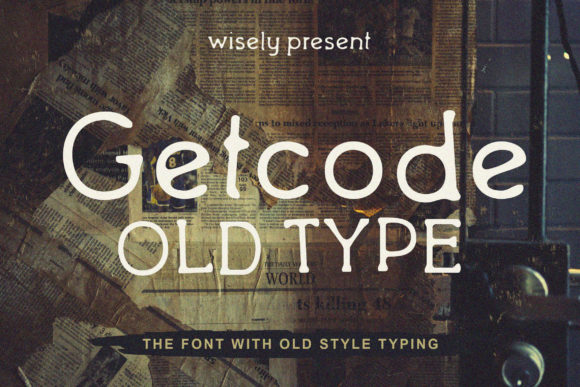
Getcode Old: A Vintage Font for Polished Branding
I was recently helping a local bakery update their product packaging to give it a more cohesive and professional look. Their previous labels felt a bit cluttered, and the fonts used didn’t quite match the warm, nostalgic vibe of their brand. That’s when I stumbled upon Getcode Old, a vintage-styled display font that immediately caught my eye.
Getcode Old has this charming, retro feel with its slightly rounded edges and subtle serifs. It reminds me of the typography you’d see on old record covers or classic signage. The font carries a sense of nostalgia without feeling outdated, which is perfect for brands aiming to evoke warmth and authenticity.
Using Getcode Old in Real Business Materials
I decided to test Getcode Old on a few different materials to see how it would perform across various formats. First, I applied it to the bakery’s product labels. The font looked great on the front of the boxes, where it was used for the product names like “Hazelnut Croissant” and “Blueberry Muffin.” The vintage style added a touch of elegance and made the labels stand out in a friendly way.
Next, I used it on the bakery’s thank-you cards. The font worked well for the main title, but I paired it with a clean sans serif font for the body text to ensure readability. This combination kept the design visually balanced while maintaining a warm and approachable tone.
On social media, I experimented with using Getcode Old in Instagram post templates. It looked fantastic as a headline for promotional posts, especially when paired with high-quality images of baked goods. The font helped draw attention to key messages and created a consistent visual identity across all platforms.
When to Use Getcode Old
Getcode Old shines as a display font—perfect for headlines, logos, and decorative accents rather than long paragraphs of text. Its character makes it ideal for short phrases, titles, and branding elements that need to grab attention quickly.
If your brand is looking to create a vintage or retro aesthetic, Getcode Old can be a powerful tool. It works exceptionally well for boutique tags, candle jar labels, skincare product names, and even café menus. Just keep in mind that due to its stylized nature, it might not be the best choice for small labels or mobile screens where legibility is crucial.
Font Pairing Ideas
To make sure Getcode Old doesn’t overwhelm your design, consider pairing it with a complementary font. For a modern yet elegant look, I recommend combining it with a clean sans serif font like Helvetica or Arial for body text. If you want something more traditional, an elegant serif font like Georgia or Times New Roman could work beautifully alongside Getcode Old.
For a handwritten or artisanal feel, a script font such as Great Vibes or Pacifico can add a personal touch. However, always ensure that the contrast between fonts is clear enough to maintain readability and visual harmony.
Practical Tips for Using Getcode Old
Before incorporating Getcode Old into your branding, check what styles and file formats are included. Look for alternates, ligatures, and weights that might enhance your design. Also, confirm whether the font supports multilingual characters if your business operates in multiple regions.
Most importantly, ensure you have the proper commercial font licensing if you plan to use Getcode Old on merchandise, packaging, or digital downloads. This will protect both your brand and the font designer’s rights.
Typography plays a significant role in how your brand is perceived. The right font can help establish trust, convey personality, and create a memorable impression. With Getcode Old, you’re not just choosing a font—you’re shaping the first moments of connection between your brand and your customers.